BleDiscovery
Test the connection between your Garmin watch and FTMS-compatible machines. Connects, performs device discovery and captures a small real-time data sample for analysis. Results are optionally uploaded to the developer for review
The link opens the official Garmin Connect IQ Store in a new tab.
What BleDiscovery Does
The BleDiscovery app performs scanning and discovery of nearby Bluetooth Ble devices, tries to identify supported fitness machines and sensors and performs probing and detailed device discovery. Selected devices are connected to and an attempt is made to record data. Results are optionally uploaded to the user as well as the developer. The intent is to help the developer support new devices and perform troubleshooting on devices that are not working.
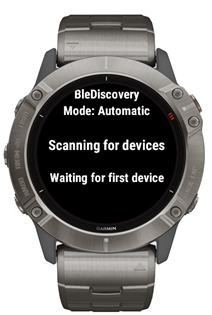
How It Looks on Your Watch
Using the App
Before launching the app, open Settings in Connect IQ. Configure your email address. Email Address is required for uploading results on completion.
After launching the app, wake up your machine. On scanning discovery the device will be connected with momentarily to complete discovery of name and supported services.
Press Next / Prev (or swipe Up / Down on touch screen devices) to scroll through multiple devices, if necessary. Press Select to begin detailed device discovery and test data collection. You should operate the machine slowly during data capture. i.e. peddal, row, step or start treadmill moving, etc. to generate some data output. Data collection ends after 15 seconds.
On data collection completion you will be prompted to upload the results. Make sure you are near your phone and select Yes to send the data. An email will be sent to you and the developer containing the device details, scanning results and collected raw bluetooth data packets (if any.)
Terms & Conditions | Privacy Policy | Contact